
CLAUDE.md and AGENTS.md: AI Project Setup Guide
Learn what CLAUDE.md and AGENTS.md are, why Markdown matters, and how to use both files to optimize AI-assisted projects.
Practical Guide
What Are CLAUDE.md and AGENTS.md?
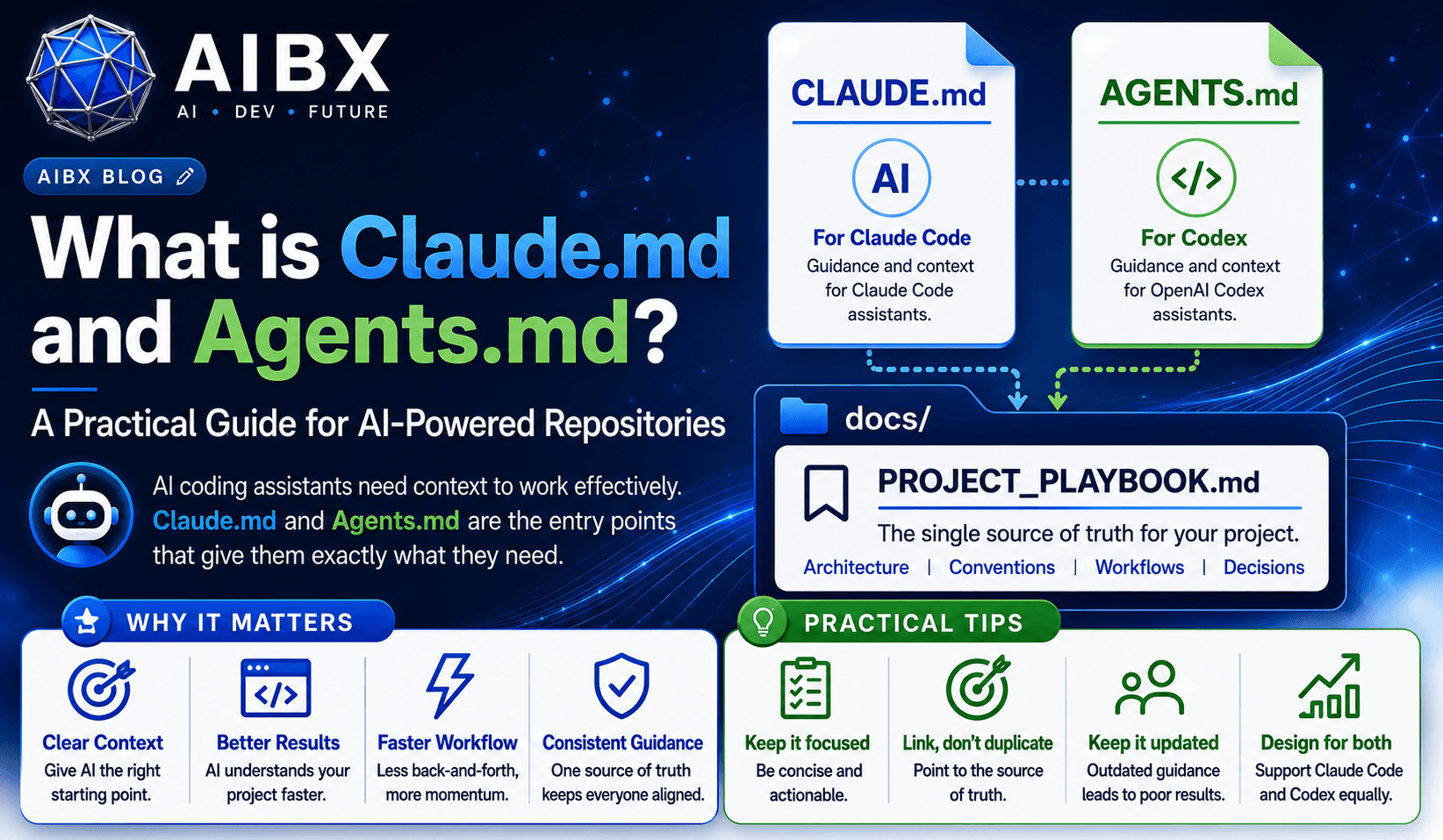
These files are the first stop for AI coding assistants inside a repository. They help Claude Code and Codex understand how a project works, what the team expects, and where the real documentation lives.
Executive Summary
`CLAUDE.md` and `AGENTS.md` are not meant to replace project documentation. They are entry points that tell AI assistants how to behave inside a repository.
The best project setup keeps those files small and directs deeper documentation into `docs/PROJECT_PLAYBOOK.md`, where the architecture, standards, and workflows can live in one place.
Core Principle
One source of truth. Two assistant entry points. Less drift.
Chapter 0
What Is a Markdown File and Why Does It Matter?
Readable by humans
Markdown stays simple, plain, and easy to scan, which makes it a strong format for repository instructions and project notes.
Easy to diff in Git
Because .md files are plain text, changes are easy to review, compare, and roll back in version control.
Portable across tools
Markdown works across editors, docs systems, and AI assistants without needing a special file format or rendering engine.
Lightweight for AI context
AI assistants can read Markdown instructions cleanly without the noise of rich formatting or proprietary document structure.
What Is CLAUDE.md?
Claude Code reads it as a project instruction file.
`CLAUDE.md` is the repository file that gives Claude Code the practical context it needs before making changes. It works best as a concise guide to the repo, not a second copy of the entire documentation site.
Project rules
Use it for language, frameworks, style conventions, and the constraints Claude should follow inside the repo.
Workflow preferences
Add rules about how Claude should analyze, plan, ask for approval, and validate changes before wrapping up work.
Repository context
Point Claude toward the important architecture, folder conventions, and docs that explain how the project is organized.
Safe boundaries
Tell Claude what it should not do, such as adding dependencies without approval or changing sensitive files casually.
What Is AGENTS.md?
Codex uses it as the entry point for repository guidance.
`AGENTS.md` serves the same architectural purpose for Codex. It tells the assistant how the repository is organized, what working rules matter, and where the deeper project playbook lives.
Codex entry point
Use it as the first place Codex looks for project instructions, operating rules, and repository-specific guidance.
Tool-specific conventions
Document the behaviors you want from Codex in a way that stays short, direct, and easy to maintain.
Shared engineering rules
Capture the same project constraints you would want any AI coding assistant to respect, regardless of surface.
Routing to deeper docs
Keep the file small and point Codex back to the single source of truth in docs/ when the project needs more detail.
CLAUDE.md vs AGENTS.md
| Area | CLAUDE.md | AGENTS.md |
|---|---|---|
| Primary purpose | Guides Claude Code with repository-specific instructions and working norms. | Guides Codex with repository-specific instructions and working norms. |
| Ideal size | Short and focused. It should point to the real documentation, not replace it. | Short and focused. It should stay minimal and avoid becoming a duplicate handbook. |
| Common mistake | People turn it into a second README or paste long policy docs into it. | People duplicate the same information from CLAUDE.md instead of keeping a shared source of truth. |
| Best practice | Use it for entry-point guidance, then send deeper knowledge into docs/PROJECT_PLAYBOOK.md. | Use it for entry-point guidance, then send deeper knowledge into docs/PROJECT_PLAYBOOK.md. |
How To Optimize Projects
Use the files to make AI work more consistently
Write the project rules once
Keep the real documentation in docs/PROJECT_PLAYBOOK.md so the project has one source of truth for architecture, workflow, and standards.
Keep entry points small
Use CLAUDE.md and AGENTS.md as wrappers that summarize the important instructions and point back to the main docs.
Be explicit about workflow
Tell the assistant how to behave: inspect first, plan before editing, keep changes scoped, and validate before completion.
Reduce duplicate instructions
Do not copy the same paragraphs into both files. That creates drift and makes maintenance harder the moment the docs change.
Optimize for reviewability
Favor short, stable instructions that help humans and assistants review the repo quickly instead of navigating long policy text.
Update the source, not the wrappers
When project guidance changes, update the playbook first and only adjust the entry-point files if the routing itself needs to change.
Recommended Structure
The cleanest repository layout keeps the truth in docs/
The pattern is simple: root-level files act as entry points, and the actual documentation lives in the docs folder.
README.md
CLAUDE.md
AGENTS.md

docs/
  PROJECT_PLAYBOOK.md
Common Mistakes
Where teams usually go wrong
Practical Checklist
Frequently Asked Questions
Is Markdown better than a richer document format for AI instructions?
For repository entry points, yes. Markdown is lightweight, easy to diff, easy to scan, and practical for both humans and assistants.
Should CLAUDE.md and AGENTS.md contain the same content?
They should usually share the same core rules, but not by copying long text. Keep the real guidance in one source and let each file point to it.
What belongs in the project playbook instead of the AI entry files?
Detailed architecture, coding standards, workflow rules, and the deeper project knowledge that should stay authoritative over time.
How do these files help optimize a project?
They reduce ambiguity, make assistant behavior more predictable, and keep project knowledge organized so the workflow is easier to maintain.
Related Reading
Useful follow-up articles on this site
If you are setting up Claude workflows, read Claude Code in VS Code.
If you are building Codex workflows, read How to Download, Install, and Use OpenAI Codex.
For the broader workflow context, read Stop Burning Through Claude Tokens and Best AI Coding Tools.
Turn insight into workflow
Need help applying this inside real operations?
AIBX helps individuals and teams turn AI knowledge into governed workflows, reusable prompts, and practical implementation systems.
Related Articles
Continue Reading
AI Coding
How to Set Up Claude Code in VS Code: Windows and Mac Guide
Set up Claude Code in VS Code on Windows and Mac with installation, authentication, CLAUDE.md, approvals, and troubleshooting guidance.
AI Coding
How to Download, Install, and Use OpenAI Codex
Learn how to download, install, and use OpenAI Codex across desktop, CLI, IDE, web, and mobile workflows with beginner-safe setup steps.
Workflows & Automation
Stop Burning Through Claude Tokens
Learn how structured workflows and prompt optimization improve Claude efficiency and reduce wasted token usage.
AI Coding
Claude Code /insights: Developer Workflow Analytics
Learn what Claude Code /insights is, how to read the report, and how enterprise teams can use it to improve AI-assisted development workflows.